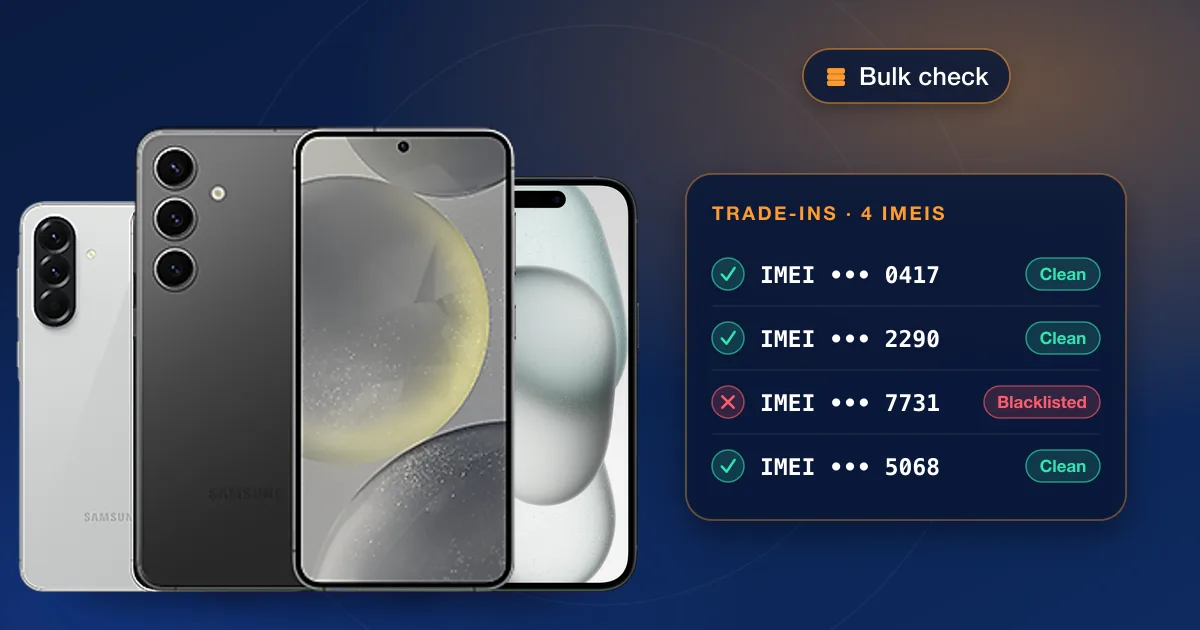
A bulk IMEI check runs a whole list of phones through the same check in one order, so a repair shop or reseller can screen every trade-in before paying for it. With a wholesale account you paste the IMEIs, one per line, into a single order, or connect your own system through our API. Each phone gets its own result, kept with the order.
Why shops check every phone
Buying a phone that turns out to be reported lost or stolen, still owed on, or locked to someone’s account is one of the costliest mistakes at a trade-in counter. The phone may be hard to resell, and a stolen one may have to be handed over. A check before you pay is usually far cheaper than one bad phone.
It protects your customers too. A phone that stops working on the buyer’s network weeks after the sale comes back as a refund and a bad review.
What a check tells you
Different checks read different records, so pick the one that answers your question:
| Check | What it tells you | Use it for |
|---|---|---|
| Blacklist | Whether the IMEI has been reported lost or stolen | Every trade-in, any brand |
| Carrier and lock | Which network the phone is tied to, and whether the lock is on | Pricing a phone, or before an unlock |
| Apple report | Model, carrier and lock policy, Find My and MDM status, warranty, purchase and first activation dates, replacement history | iPhones and iPads |
| Samsung report | Model and model number, serial, carrier, warranty, purchase date and country | Galaxy phones and tablets |
The Apple and Samsung contents above are what our current reports include, and sample reports are on the IMEI check page. The full list of checks, with live prices, is on our IMEI checks page.
How to check many IMEIs at once
- 1Open a wholesale accountApply on our wholesale page. Once your account is approved, you order from the wholesale portal at your account’s prices.
- 2Paste the listPick a check and paste your IMEIs, one per line. Most checks take a whole list in one order; a few take one IMEI at a time, and the order form says so.
- 3Read the resultsEvery IMEI gets its own result in your order history, so a batch of trade-ins stays together as one order you can come back to.
- 4Automate it (optional)If you run your own software or a Dhru Fusion panel, API access places the same orders and collects results automatically. It is switched on after a short review of what you’ll connect.
Keeping records
A result is only useful if you can find it later. Keep each check with the device’s intake record: the IMEI, the date you checked, the seller’s details and what you paid. If a phone is reported after you bought it, that record shows what you knew at the time.
Check again if a phone sits in stock for a while. A report can be added after your first check, and a quick recheck before you sell catches it.
What checks can’t do
- A check reports what the records say at that moment; it doesn’t change them. Only the carrier that added a lost or stolen report can remove it.
- A clean check isn’t a hardware inspection. Test the screen, battery, cameras and buttons as usual.
- Carrier details depend on the records each maker and carrier keep, so a result can occasionally show a carrier as unknown.
Pricing
Wholesale prices depend on the check and your account, and you see them in the portal once you’re approved. We don’t type prices into guides, because they change with supplier costs. For everything a wholesale account includes, read the wholesale and reseller overview.